AI settings: models, budgets, meetings and voice
Choose models, daily budgets, meeting notes and voice limits.
AI settings determine how Era works, which sources it uses and spending limits. Web and desktop: Settings → AI. Subscription/key setup is explained under Sources.
Before you start
AI management and connecting your provider require different access. Inspect the shared setting scope.
Subscriptions, API keys and Auto
Steps and focused answers.
Usage, quotas and background work
Steps and focused answers.
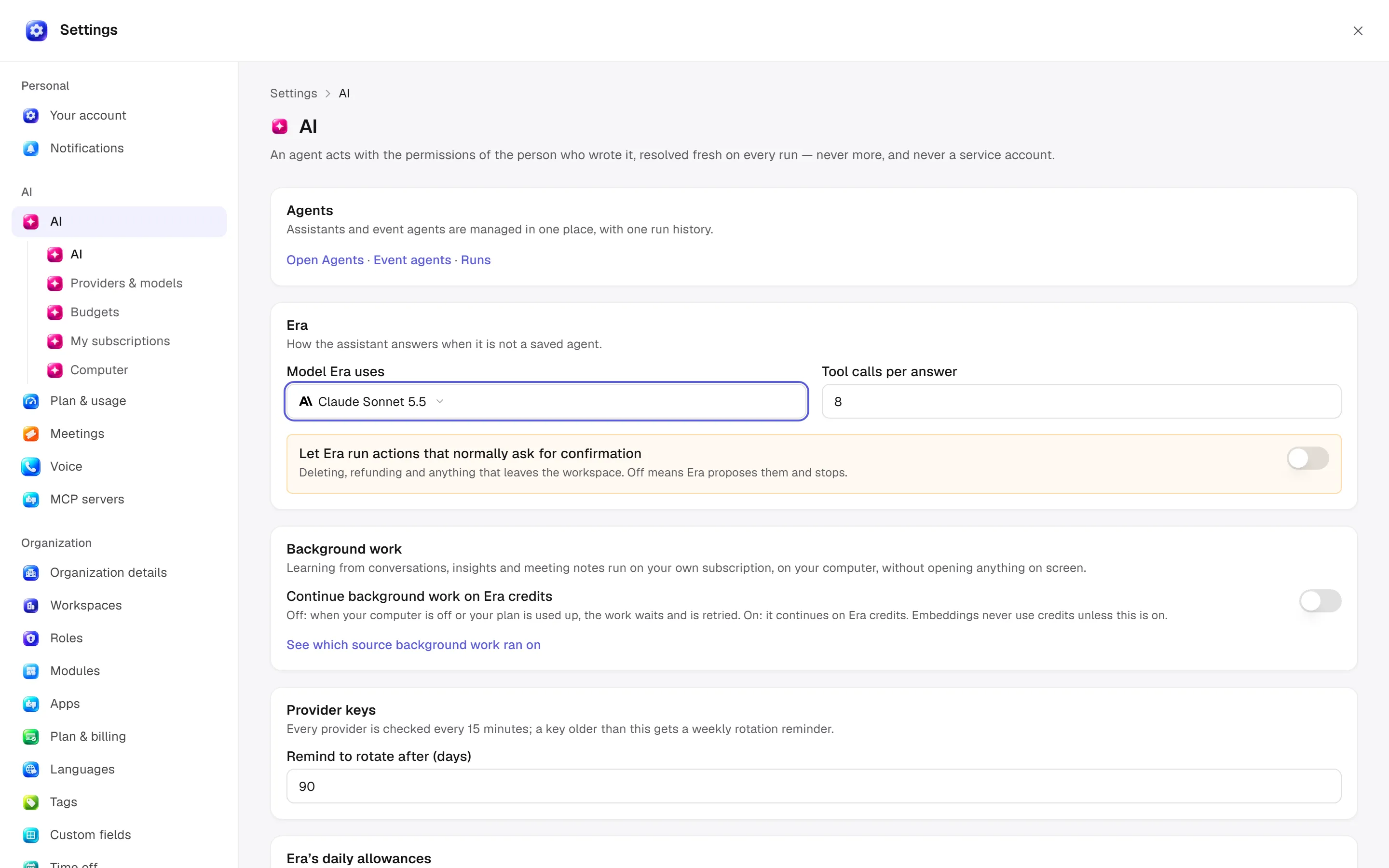
Working preferences — /settings/ai
| Option | Effect |
|---|---|
| Model Era uses | Source/model picker; default for later answers, separate from saved agent/workflow choices. |
| Tool calls per answer | 1–40; bounds operation steps in one answer. |
| Normally confirmed actions | Unattended-work preference; action, role and approval safeguards still apply. |
| Key rotation reminder | 7–730 days; weekly reminders for old keys after provider checks. |
Open Agents / Event agents / Runs links open /agents rather than another agent list here.
Providers — /settings/ai/providers
Add a provider, rotate keys, set custom endpoints, choose personal use or disconnect. Model per kind of work selects a main and fallback model. Empty rows use Auto; fallback is tried once when the first model refuses. What each model costs shows catalogue prices and who pays here. Prices are not quotes; some catalogue prices can be estimates.
Era is not a model provider and keeps no key of its own: every call goes straight to the provider on a connected key (your own, one shared with you, or the workspace's). What each call cost is on the usage page; caps are under Budgets.
Budgets — /settings/ai/budgets
Add budget: whole workspace or one agent, daily USD, monthly USD and alert percentage (1–100, default 80). Empty caps mean no limit for that period. Workspace caps bind all work; agent caps narrow further and the tighter limit blocks first. Edit caps/alerts in rows; removing a budget removes that scope's cap. The last-30-days table shows source/model, runs, input/output/cache tokens, tool calls and USD cost.
Meetings — /settings/meetings
My calendars: connect an account, toggle it or disconnect. Era reads the next seven days. Each connection has Era joins / How / Notes go to preferences.
Notetaker: name in the call, notes language, monthly minutes, longest meeting, brief lead time and recording notice. The owner placeholder becomes your name; blank uses Era's notice.
Service: default Recall.ai or supported own-account choice; who pays, API key, webhook address and signing secret. Recordings: retention days (0 = keep) and who sees new meetings besides the owner. Transcripts and notes remain after audio removal. Remembered voices reuses corrected speaker names.
Voice — /settings/voice
Monthly call-minute cap and daily calls Era may place. At the limit callers receive a stopping message. Finished calls are checked every five minutes. For instant delivery on your own ElevenLabs account, register the displayed post-call webhook URL and secret with the provider.
MCP — /settings/integrations/mcp
Connect external tool servers. Do not confuse MCP settings with desktop-local MCP connections.
Who changes these?
AI management uses ai.manage; budgets and service options check their respective module-management permissions. Connecting your own account/key differs from changing shared organization settings. Ask Era “Explain this agent's daily spending limit and chosen model.” See usage.
See the model catalogue for names/capabilities and computer rules for site, step and time limits.