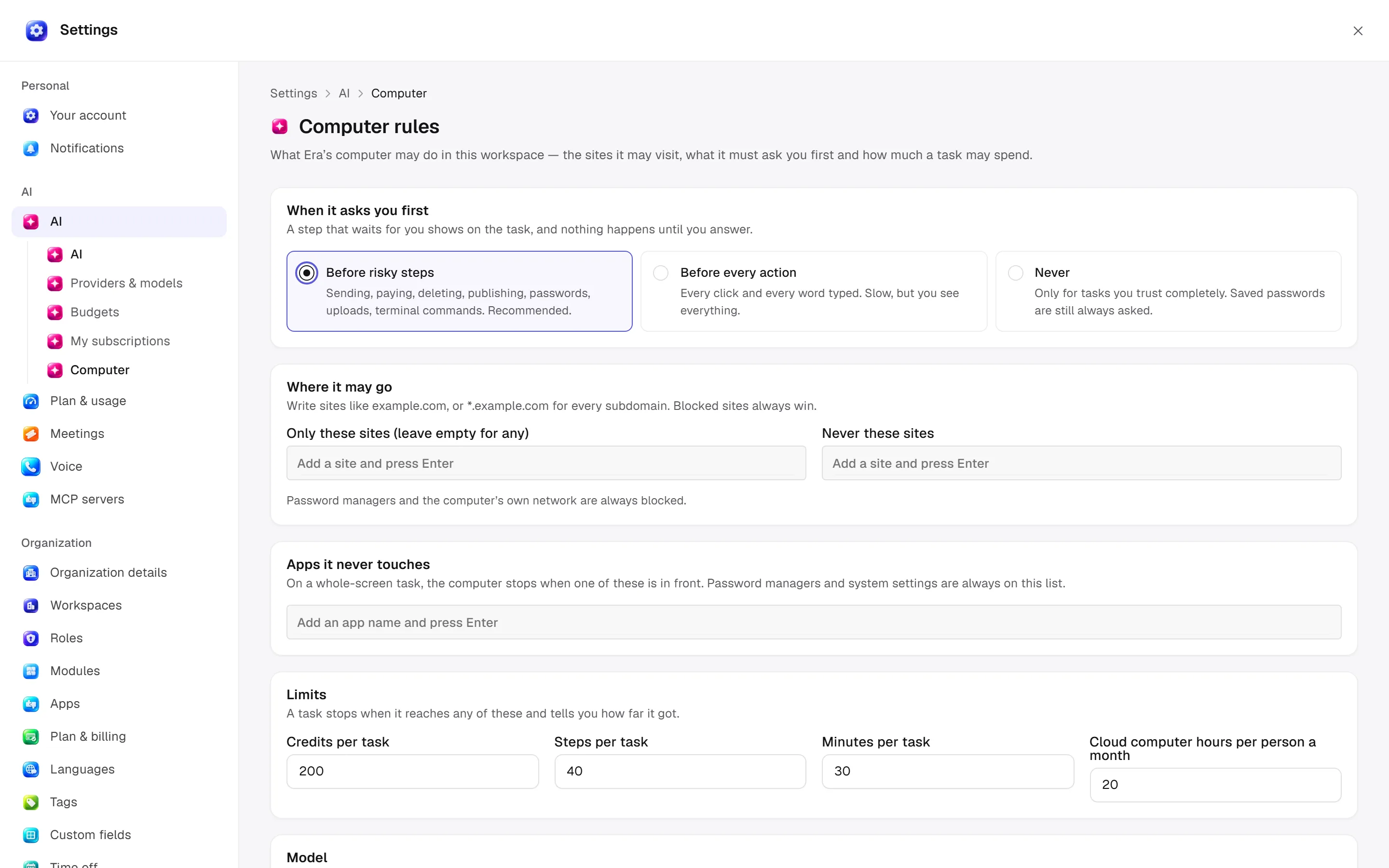
Rules for computer tasks
Set site, step and time limits for computer tasks.
Web: Settings → AI → Computer. Desktop business settings can open the same rules; Advanced → Computer use handles local OS permission/previews. Task managers use these rules to limit destinations and approval steps.
Before you start
Local screen access is separate. A task reports where it stopped after reaching a ceiling.
Computer use and AppSnap
Steps and focused answers.
Approvals and Full access
Steps and focused answers.
| Option | Effect |
|---|---|
| Before risky steps | Wait before sending, paying, deleting, publishing, passwords, uploads and terminal commands. |
| Before every action | Wait before every click/typing action; slower. |
| Never | For fully trusted jobs; saved passwords still ask. |
| Only these sites | Empty permits any otherwise allowed site; *.example.com includes subdomains. |
| Never these sites | Denied domains always win. |
| Apps it never touches | Whole-screen work stops when one is frontmost; password managers/system settings are built-in denials. |
| Steps per task | Action-count ceiling. |
| Minutes per task | Duration ceiling. |
| Monthly cloud hours per person | Cloud-computer usage ceiling. |
| Model | Vision-capable default if the task does not select one. |
| Cloud provider | Era default, boxd, E2B or DigitalOcean; existing computers retain their provider. |
Local networks and password managers are always blocked. Domain lists support up to 200 entries and app lists up to 100. A job stops and reports progress when any ceiling is reached. Estimated provider prices are not invoice quotes.
Saved sign-ins
Add sign-in sets name, username/email and password in the vault. Rows show labels/secret references, not full passwords. Remove deletes the saved credential, not the third-party account. The task model should not copy it into chat; password use has separate approval.
Rule management and credential management may require separate permissions. Save rules is limited to permitted managers. Ask Era “What site and time limits apply to this task?” See computer use and approvals.