Desktop-only settings, option by option
Configure appearance, chat behavior, engines and machine options.
Settings is at the bottom of the sidebar. Desktop uses /settings?section=…; a business settings path can open through era-business with a page parameter. Web and desktop addresses are not identical. Sections group under Personal / AI / Organization / Products / Advanced; business pages hidden by your role are absent.
Before you start
Local preferences affect this device; business settings can affect a shared server scope. Check the heading.
Personal settings and notifications
Steps and focused answers.
Desktop questions
Steps and focused answers.
Personal → General
| Option | Effect |
|---|---|
| Default provider | Engine for new chats, not an automatic replacement in saved chats. |
| New threads | Workspace/checkout mode for new draft chats. |
| Delete worktree on archive | Removes orphaned separate Git checkouts for local development work. |
| Move sent messages to top | Reading position after sending. |
| Tabs | Open chats and business pages as tabs at the top. |
| Chat order | How chats are sorted in the sidebar. |
| Working and unread on top | Prioritizes attention-needed conversations. |
| Chats / Hubs / Automation runs | Visibility of supported local sidebar sections. |
| Open Environment by default | Local chat information panel. |
| Subagents / Repository / PR / Editor | Technical information rows in that panel. |
| Recap / Pinned messages / Project instructions / Notepad | Context and notes sections. |
An option existing in code does not mean its local surface appears in every business chat.
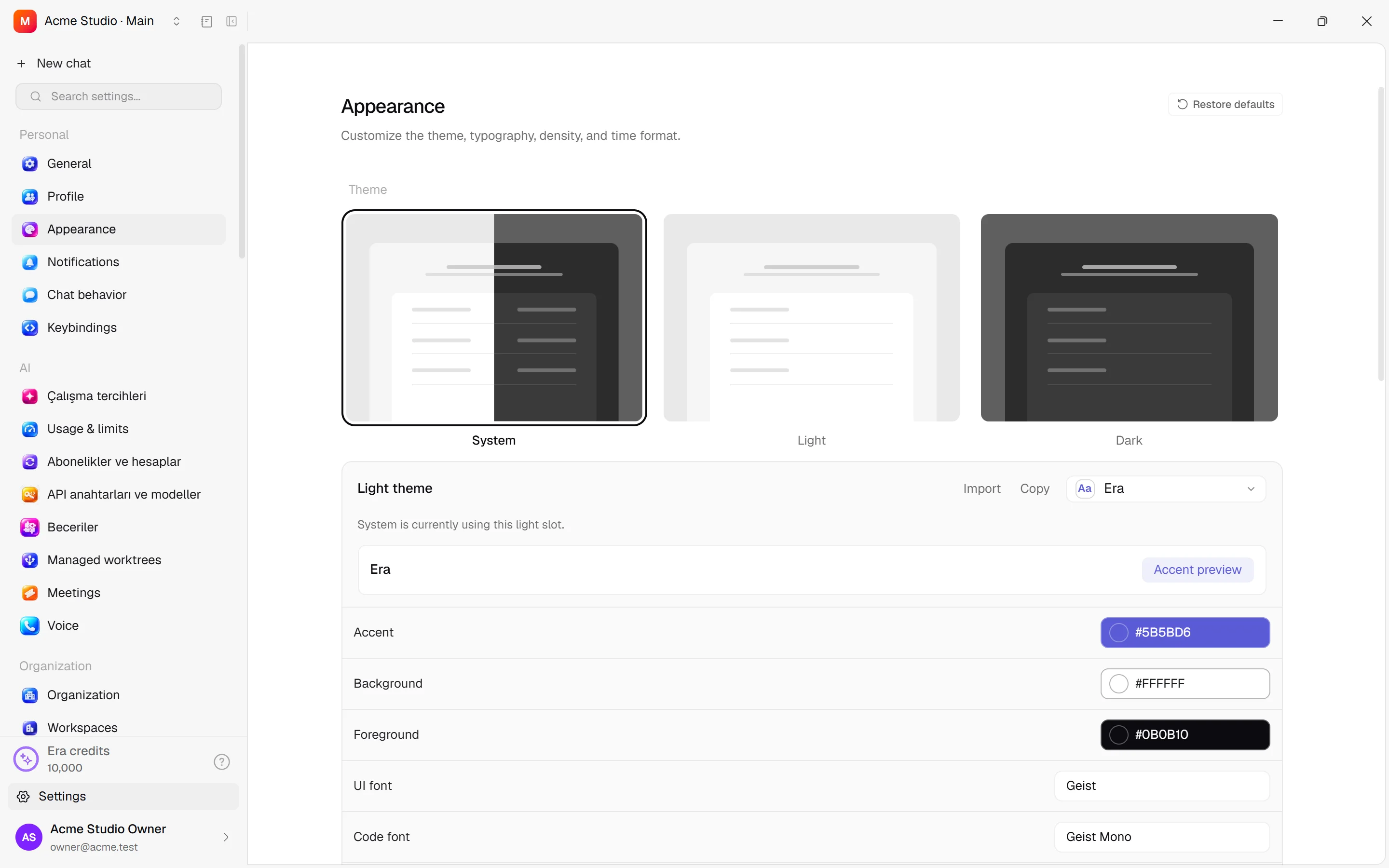
Personal → Appearance
Theme: system/light/dark. App icon: dock/taskbar appearance. Custom title bar: supported platform window frame; restart may be needed. System UI font, UI density, Chat width and Base font size affect text/spacing. Terminal font size/font independently change terminal text. Font smoothing affects supported-platform rendering. Time format follows system or offered 12/24-hour choice; it does not change business time zone.
Personal → Notifications and Profile
Activity toasts are in-app alerts; Desktop notifications use the OS; Wait for subagents delays completion alerts until subwork finishes. OS permission is separate. Profile shows local activity/streaks/statistics rather than organization-role editing.
Personal → Chat behavior
Follow-up behavior selects steering/queue defaults; Side chat expiry sets side-conversation lifetime; Enter while dictating sets Enter behavior. Assistant output streams tokens; Fold finished turns collapses completed work; Effort slider displays reasoning controls. Message trail microphone/sound configures supported voice-trail features. Automatically open simulator controls relevant device previews.
Review options: Diff layout stacked/split; Open pull requests and issues in built-in review, in-app browser or external browser. Ctrl/Cmd + click always opens externally. PR diff colors marks additions/deletions; Include fork upstreams adds upstream repositories; Diff line wrapping sets wrapping defaults. Safety: separate Delete / Archive / Terminal close confirmations. These do not remove business payment/send approvals.
Personal → Keybindings
Search a command and add/change/remove its shortcut; capture a combination in the recorder. Resolve conflicts by choosing another combination. Reset restores defaults. Ctrl + . toggles the business Era pane. OS-global and in-app shortcuts differ.
AI → Computer
What Era's computer may do in this workspace (the web's /settings/ai/computer): when it asks you first, the sites it may and may never visit, the apps it never touches, the step/minute limits per task and the monthly cloud hours per person, the model that drives it, and the provider for new cloud computers. Saved sign-ins are passwords it may type on a site, only after you approve each time; the AI never sees them. Changing the rules needs AI manage rights; adding a sign-in needs Apps manage rights. Leaving the page with unsaved changes asks first.
AI → Local providers, models and skills
Provider enablement, picker visibility/order, account labels/defaults, sign-in, identity, binary paths, environment variables and CLI update checks are explained in local engines.
Models: Source control writing style, Custom writing instructions and Git writing model affect generated commits/PRs/branch names. Custom model slugs save names for supported providers; they do not create nonexistent models or grant API access. Business defaults remain in AI working preferences. Manage local skills here; shared business skills live in Skills. Usage — subscriptions (5-hour and weekly limits), API keys, plan and workspace — has one screen: Settings → Usage, the same page as on the web.
Advanced
AppSnap: enable, shortcut, destination and sound. Computer use: control, cursor colors, automatic compact/large preview and missing OS grants; details.
MCP connections: name, all/selected projects and optional existing-task/shared-checkout/unapproved-execution access. Connections last 30 days and can be revoked. Give the generated setup prompt to your engine; manual setup offers terminal pairing and MCP JSON. Try the sample request afterward. This differs from granting an agent external-server tools at /settings/integrations/mcp.
Worktrees lists managed Git checkouts and linked conversations; inspect linked-chat warnings before deletion. Archived supports restore, permanent delete or delete all. Restore returns a conversation to the sidebar.
Session revokes this browser connection and needs fresh pairing. Developer tools / keybindings.json allow advanced editing. Recovery tools rebuild indexes without clearing chats. About shows version; Release history lists past update notes.
Who is affected?
Local preferences affect this app; organization/product pages use server permissions and can be shared. Check the page heading first. Ask Era “Explain the difference between my dictation and queue behavior.” See web personal settings.