Agreements collections and expenses
Finance teams track obligations, instalments, collections, refunds, expenses and commissions as separate records.
Finance teams track obligations, instalments, collections, refunds, expenses and commissions as separate records.
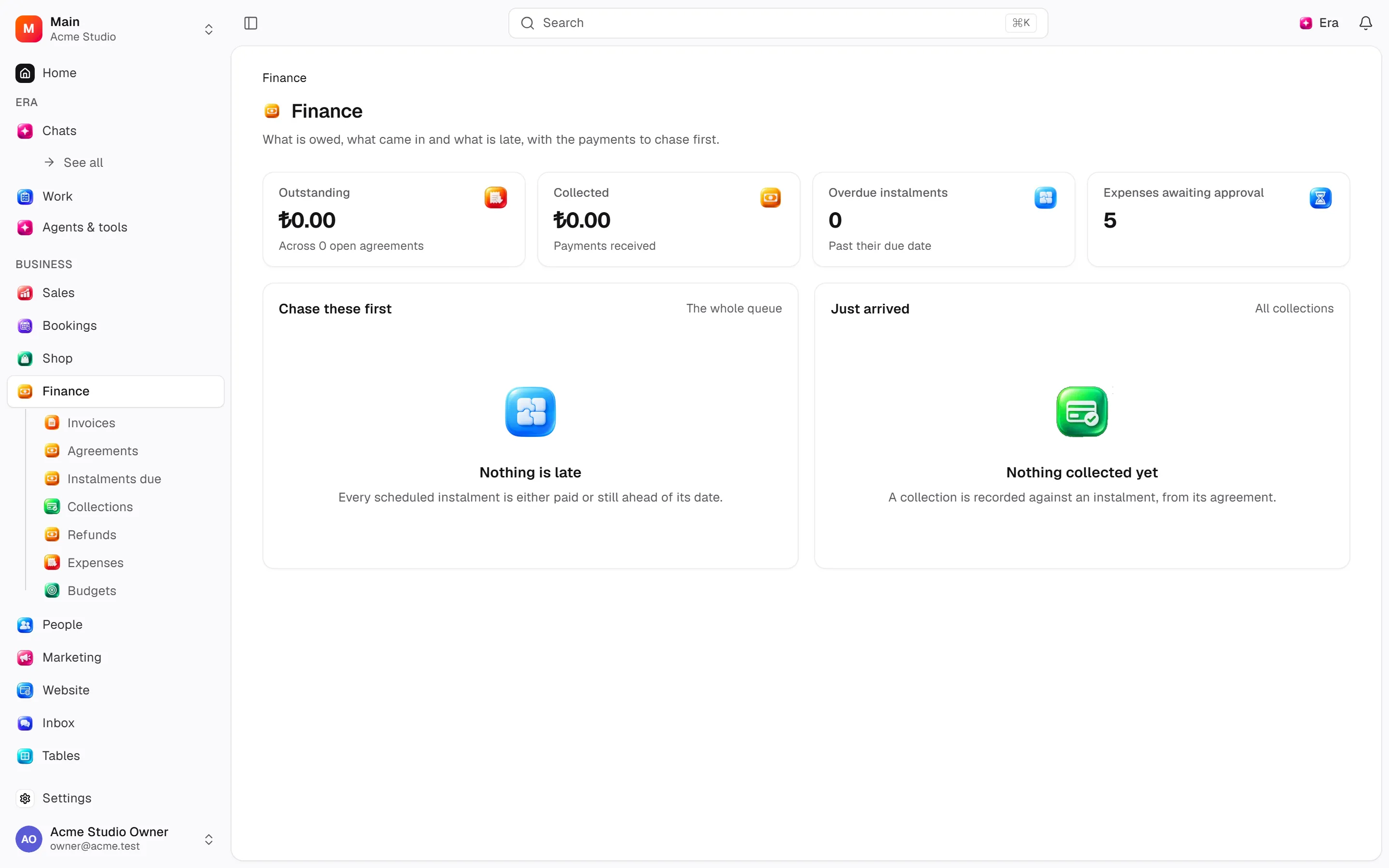
Where to find it
Web: open Finance. Desktop: Business → Finance, using the same record paths. Disabled modules or missing read permission remove the navigation entry.
| Screen / tab | Web path | Usage | Desktop |
|---|---|---|---|
| Finance | /finance | List, view or tab | Native screen |
| Agreements | /finance/agreements | List, view or tab | Native screen |
| Instalments due | /finance/installments | List, view or tab | Native screen |
| Collections | /finance/payments | List, view or tab | Native screen |
| Refunds | /finance/refunds | List, view or tab | Native screen |
| Expenses | /finance/expenses | List, view or tab | Native screen |
| Commissions | /finance/commissions | List, view or tab | Native screen |
| Record details | /finance/subscriptions/[[...slug]] | Record or editor | Native screen |
| Record details | /finance/gift-cards/[[...slug]] | Record or editor | Native screen |
| New expense | /finance/expenses/new | List, view or tab | Native screen |
| Record details | /finance/expenses/[id] | Record or editor | Native screen |
| New agreement | /finance/agreements/new | List, view or tab | Native screen |
| Record details | /finance/agreements/[id] | Record or editor | Native screen |
Start working
Step 1
Open an agreement.
Step 2
Schedule instalments and review discounts/balance.
Step 3
Record/allocate collections and provider outcomes.
Step 4
Request/approve/reject refunds.
Step 5
Record/approve/pay expenses and track commissions.
Settings
Option-by-option configuration and screen paths: Settings guide.
- General ·
/settings/finance - Expense categories ·
/settings/finance/expense-categories - Payments ·
/settings/payments
Permissions and limits
Before you start
Collections do not issue invoices. Stored money uses minor units; forms show major units. Stopping recurring expenses preserves history.
Role capabilities: Read (read), Write (write), Delete/archive (delete), Manage (manage), Approve (approve), Export (export), Comment (comment), Own records only (own_records_only).
Own-record restrictions apply equally to lists, records and Era. Record state or missing data can refuse an otherwise permitted action.
Ask Era
Show overdue instalments this week and total outstanding.
Select relevant records for Era context. Era respects modules/roles; external or confirmation-sensitive work can stop for approval. Use era tools in the terminal to inspect currently available tools.
Automation and events
These declared events are available to module-event triggers. Subscribing does not configure the next operation; choose recipients, conditions and actions separately.
Operation details
The inventory includes record, configuration, visitor and background flows. IDs support Era/automation; not every row is a menu button. Asterisks mark required inputs. Unmapped rows do not imply a visible control.
| Operation and ID | Inputs | Permission | Screen or flow |
|---|---|---|---|
Open an agreement · finance.create_agreement | Person *, Kind, What it is for, Internal note, Currency, Subtotal, Tax, Lines, Came from, Source record, Referred by | Write | /finance/agreements, /leads |
Edit an agreement · finance.update_agreement | Agreement *, Status, What it is for, Internal note, Subtotal, Tax | Write | /finance/agreements/[id], /leads |
Cancel an agreement · finance.cancel_agreement | Agreement *, Reason | Manage | /finance/agreements/[id] |
Schedule instalments · finance.schedule_installments | Agreement *, Instalments * | Write | /finance/agreements/[id], /leads, /shop/orders/[id] |
Edit an instalment · finance.update_installment | Instalment *, Due date, Amount, Note | Write | /finance/agreements/[id] |
Cancel an instalment · finance.cancel_installment | Instalment * | Manage | /finance/agreements/[id] |
Record a collection · finance.record_payment | Instalment *, Amount *, Method, Method detail, Provider reference, Idempotency key, When it happened, Note | Write | /finance/agreements/[id], /leads, /shop/orders/[id] |
Allocate a collection · finance.allocate_payment | Collection *, Allocations * | Write | /finance/payments |
Refund a collection · finance.refund_payment | Collection *, Amount *, Reason * | Manage | /finance/agreements/[id] |
Request a refund · finance.request_refund | Collection *, Amount *, Reason *, Idempotency key | Write | /finance/agreements/[id], /shop/orders/[id] |
Approve a refund · finance.approve_refund | Request * | Approve | /finance/refunds |
Reject a refund · finance.reject_refund | Request *, Reason * | Approve | /finance/refunds |
Draft an agreement for a record · finance.open_draft_for_source | Came from *, Source record *, Person *, Kind, Total, Currency, What it is for, Open as active, What was sold, Tax on top, Discounts applied at the source, Came through affiliate, Paid by gift cards | Write | Background routine |
Answer a cancellation · finance.request_refunds_for_source | Came from *, Source record *, Reason | Write | Background routine |
Record the shop’s discounts · finance.record_source_discounts | Came from *, Source record *, Discounts | Write | Background routine |
Apply a discount · finance.apply_discount | Agreement *, Kind, Value *, Label, Reason * | Write | /finance/agreements/[id] |
Remove a discount · finance.remove_discount | Discount * | Manage | /finance/agreements/[id] |
Accrue a commission · finance.accrue_commission | Agreement *, Rate (%) (0–100), Amount | Write | /finance/agreements/[id] |
Recalculate the commission · finance.recalculate_commission | Agreement, Collection | Write | /finance/agreements/[id], /finance/commissions |
Record a gift card collection · finance.record_gift_card_payment | Came from *, Source record *, Gift card *, Redemption *, Amount *, Currency *, Last characters of the code | Write | Background routine |
Return a gift card collection · finance.return_gift_card_payment | Came from *, Source record *, Gift card *, Amount *, Idempotency key | Write | Background routine |
Move a commission · finance.set_commission_status | Commission *, Status *, Paid on | Manage | /finance/commissions |
Cancel a commission · finance.cancel_commission | Commission * | Manage | /finance/commissions |
Save an expense category · finance.save_expense_category | Category, Name *, Description, Colour | Manage | /settings/finance/expense-categories |
Deactivate an expense category · finance.deactivate_expense_category | Category * | Manage | /settings/finance/expense-categories |
Record an expense · finance.create_expense | Category *, What it was *, Description, Amount *, Currency, Date *, Paid by, Supplier, Supplier contact, Receipt, Recurring, Every, Next due, Repeat until | Write | /finance/expenses |
Edit an expense · finance.update_expense | Expense *, What it was, Description, Amount, Supplier, Supplier contact, Receipt, Category, Date, Paid by | Write | /finance/expenses |
Approve an expense · finance.approve_expense | Expense * | Approve | /finance/expenses |
Reject an expense · finance.reject_expense | Expense *, Reason * | Approve | /finance/expenses |
Mark an expense paid · finance.mark_expense_paid | Expense *, Paid on | Write | /finance/expenses |
Void an expense · finance.void_expense | Expense *, Reason * | Manage | /finance/expenses |
Take a payment · finance.take_payment | Instalment *, Amount *, Provider, Mode, Test outcome, Method, Idempotency key, Note, Return URL, Cancel URL, Customer email | Write | /finance/payments |
Capture a payment · finance.capture_payment | Payment *, Amount, Test outcome | Write | /finance/payments, /shop/orders/[id] |
Release a payment · finance.cancel_payment | Payment *, Test outcome | Write | /finance/payments, /shop/orders/[id] |
Configure a payment app · finance.configure_payment_app | Provider *, Connected app *, Enabled, Test mode, Order, Checkout label | Manage | /settings/payments |
Record a payment webhook · finance.record_provider_webhook | Provider *, Provider event *, Payment, Provider reference, Event type *, Amount *, Currency *, Message, Occurred at *, Payload digest * | Write | Record/API/visitor flow; no separate screen button mapped |
Record a commission payout · finance.record_commission_payout | Affiliate *, Commissions *, Paid on, Method, Transfer reference, Note | Approve | /finance/commissions |
Record recurring expenses · finance.run_recurring_expenses | As of | Write | /finance/expenses |
Stop repeating · finance.stop_recurring_expense | Expense * | Write | /finance/expenses |
Raise instalment reminders · finance.raise_installment_notices | As of | Write | Background routine |
Pay for an order (site) · finance.pay_site_order | Basket *, Payment method, Return URL, Cancel URL | Write | Record/API/visitor flow; no separate screen button mapped |
Pay by link (site) · finance.pay_site_agreement | Payment link *, Payment method, Return URL, Cancel URL | Write | Record/API/visitor flow; no separate screen button mapped |
Related guides
Settings
Options, screen paths and defaults.
Workflows
Operations managers connect triggered blocks on a canvas with conditions, loops and approval waits.
Finance
Finance — modules and detailed settings
Technical sources
packages/os-kernel/src/modules/finance.ts, packages/os-kernel/src/modules/index.ts, apps/studio/lib/os/navigation.ts, apps/studio/lib/os/settings-groups.ts, apps/era-station/apps/web/src/era/business/screens.ts.
Screen pictures
Collection custom fields
Payment custom fields are available in the Collections column menu, sorted by their field type and editable in place when permitted. The same fields appear on web and native desktop.