Classes and sessions
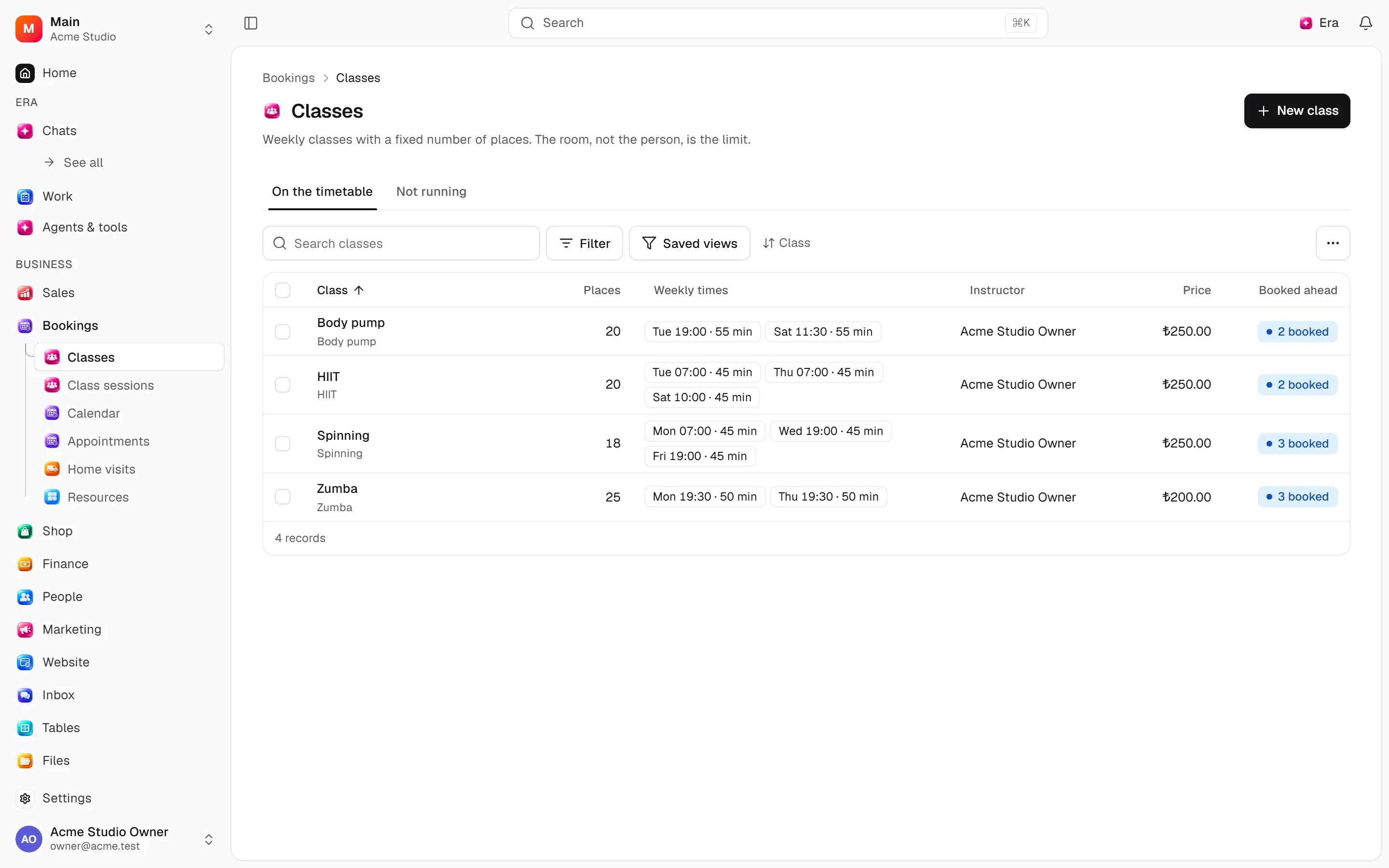
Managers create weekly series; reception books dated sessions. Class definitions, schedules and sessions are separate.
Managers create weekly series; reception books dated sessions. Class definitions, schedules and sessions are separate.
Where to find it
Web: open Bookings. Desktop: Business → Bookings, using the same record paths. Disabled modules or missing read permission remove the navigation entry.
| Screen / tab | Web path | Usage | Desktop |
|---|---|---|---|
| Classes | /classes | List, view or tab | Native screen |
| Class sessions | /classes/sessions | List, view or tab | Native screen |
| New class | /classes/new | List, view or tab | Native screen |
| Record details | /classes/[id] | Record or editor | Native screen |
Start working
Step 1
Create a class with services, capacity and resources.
Step 2
Add/edit weekly times or end the series.
Step 3
Book/cancel places in Sessions.
Step 4
Record attendance or cancel one session.
Settings
Option-by-option configuration and screen paths: Settings guide.
- Class rules ·
/settings/classes
Permissions and limits
Before you start
Capacity and booking windows can prevent joining. Retiring a class differs from cancelling one session.
Role capabilities: Read (read), Write (write), Delete/archive (delete), Manage (manage), Export (export), Comment (comment), Own records only (own_records_only).
Own-record restrictions apply equally to lists, records and Era. Record state or missing data can refuse an otherwise permitted action.
Ask Era
Show next week’s sessions and remaining places.
Select relevant records for Era context. Era respects modules/roles; external or confirmation-sensitive work can stop for approval. Use era tools in the terminal to inspect currently available tools.
Automation and events
These declared events are available to module-event triggers. Subscribing does not configure the next operation; choose recipients, conditions and actions separately.
Operation details
The inventory includes record, configuration, visitor and background flows. IDs support Era/automation; not every row is a menu button. Asterisks mark required inputs. Unmapped rows do not imply a visible control.
| Operation and ID | Inputs | Permission | Screen or flow |
|---|---|---|---|
Create a class · group_classes.create_class | Name *, Places * (1–10000), Instructor, Services *, Weekly times * | Manage | /classes |
Edit a class · group_classes.update_class | Class *, Name, Places (1–10000), Instructor, No default instructor | Manage | /classes, /classes/[id] |
Change the services · group_classes.set_services | Class *, Services * | Manage | /classes/[id] |
Retire a class · group_classes.archive_class | Class * | Manage | /classes/[id] |
Add a weekly time · group_classes.add_schedule | Class *, Day * (0–6), Starts *, Length (minutes) * (1–1440), Instructor, First session from | Manage | /classes/[id] |
Edit a weekly time · group_classes.update_schedule | Series *, Day (0–6), Starts, Length (minutes) (1–1440), Instructor, Use the class’s instructor | Manage | /classes/[id] |
End a series · group_classes.end_schedule | Series *, Last session on *, Reason * | Manage | /classes/[id] |
Cancel one session · group_classes.cancel_session | Series *, Date *, Reason * | Manage | /classes/[id] |
Book a place · group_classes.join | Series *, Date *, Customer * | Write | /appointments/new, /classes/sessions |
Cancel a class booking · group_classes.cancel_joining | Booking *, Reason * | Write | /classes/sessions |
Record attendance · group_classes.mark_attendance | Booking *, Attended * | Write | /classes/sessions |
Book a class place online · group_classes.join_online | Series *, Date * | Write | Record/API/visitor flow; no separate screen button mapped |
Related guides
Settings
Options, screen paths and defaults.
Workflows
Operations managers connect triggered blocks on a canvas with conditions, loops and approval waits.
Bookings
Bookings — modules and detailed settings
Technical sources
packages/os-kernel/src/modules/group-classes.ts, packages/os-kernel/src/modules/index.ts, apps/studio/lib/os/navigation.ts, apps/studio/lib/os/settings-groups.ts, apps/era-station/apps/web/src/era/business/screens.ts.