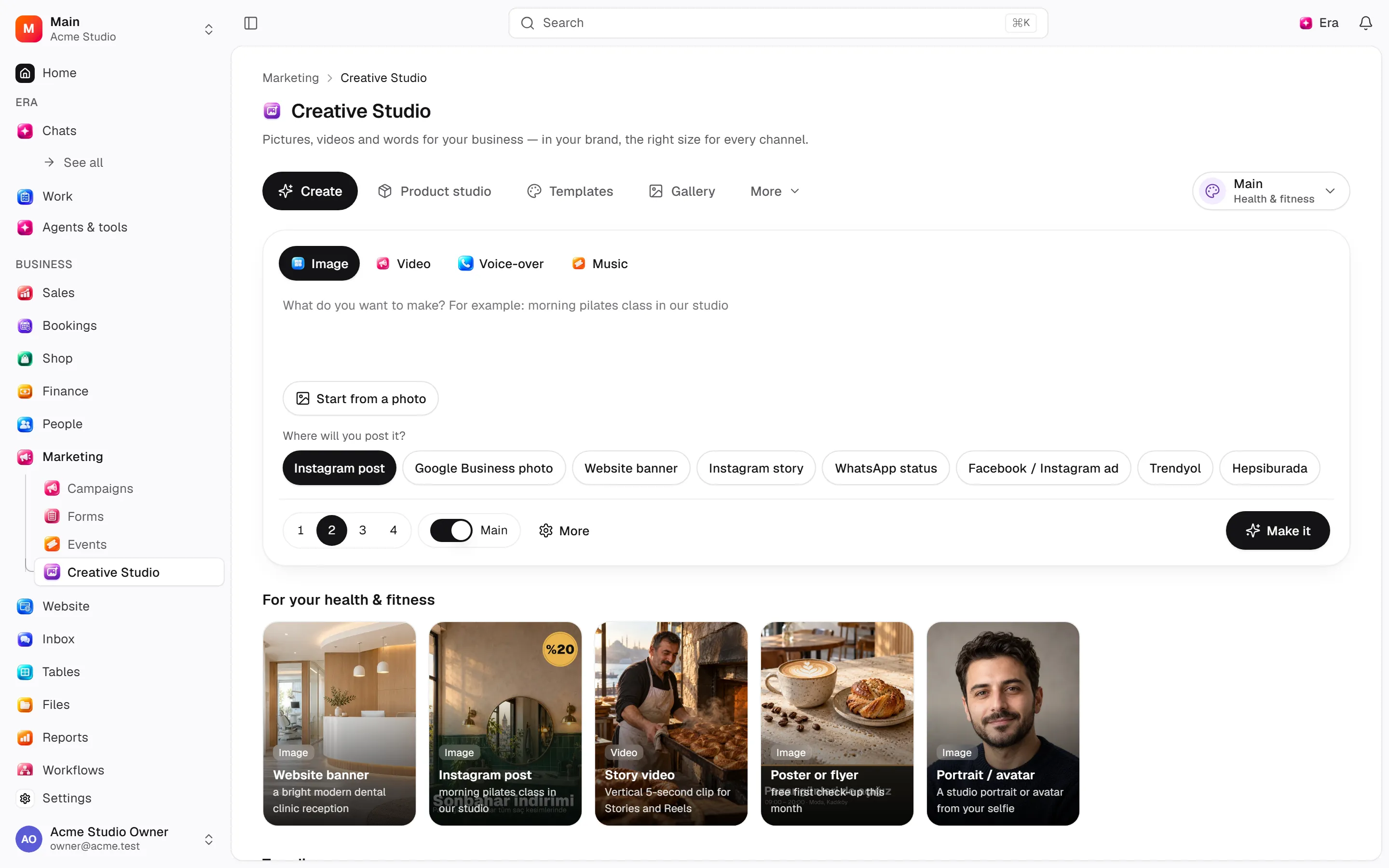
Creative Studio for business
Marketing teams prepare business visual/text drafts; source and model details belong to Era AI guides.
Marketing teams prepare business visual/text drafts; source and model details belong to Era AI guides.
Settings
Options, screen paths and defaults.
Browse this area
Marketing — modules and detailed settings
Where to find it
Web: open Marketing. Desktop: Business → Marketing, using the same record paths. Disabled modules or missing read permission remove the navigation entry.
| Screen / tab | Web path | Usage | Desktop |
|---|---|---|---|
| Creative Studio | /creative — one address per studio, see The studios | Studio suite | Native screen |
Start working
Step 1
Describe output/use in Creative Studio.
Step 2
Add brand context/references.
Step 3
Review and request edits/variants.
Step 4
Check before using/publishing.
Settings
Option-by-option configuration and screen paths: Settings guide.
There is no separate settings route; the guide distinguishes record options from declared defaults.
Permissions and limits
Before you start
Generation depends on sources/permissions. Drafts do not publish campaigns/sites. No separate business settings exist.
Role capabilities: Read (read), Write (write), Delete/archive (delete), Handle automated delivery/jobs (handle).
Own-record restrictions apply equally to lists, records and Era. Record state or missing data can refuse an otherwise permitted action.
Ask Era
Draft three social visuals using brand colours.
Select relevant records for Era context. Era respects modules/roles; external or confirmation-sensitive work can stop for approval. Use era tools in the terminal to inspect currently available tools.
Automation and events
These declared events are available to module-event triggers. Subscribing does not configure the next operation; choose recipients, conditions and actions separately.
Operation details
The inventory includes record, configuration, visitor and background flows. IDs support Era/automation; not every row is a menu button. Asterisks mark required inputs. Unmapped rows do not imply a visible control.
| Operation and ID | Inputs | Permission | Screen or flow |
|---|---|---|---|
Generate an image, video, voice-over or music · creative.generate | What to make, Kind, Preset, Model, Shape, Length (seconds) (1–30), How many (1–4), Voice, Starting photos, Your clip, Resolution, Starting photos on the web, Audio, Use the brand kit, Editing agent, Upscale (2–4), Cloned voice, Edit the last picture, Channel, Product, Made from | Write | Record/API/visitor flow; no separate screen button mapped |
Start a generation · creative.start_generation | Generation * | Handle automated delivery/jobs | Background routine |
Finish a generation · creative.complete_generation | Generation *, Results *, Model, Provider, Paid by, Cost (USD), Whose connection, Self-check | Handle automated delivery/jobs | Background routine |
Mark a generation failed · creative.fail_generation | Generation *, Why | Handle automated delivery/jobs | Background routine |
Wait for the owner’s computer · creative.park_generation | Generation *, Runner job * | Handle automated delivery/jobs | Background routine |
Cancel a generation · creative.cancel | Generation * | Write | /creative |
Favourite · creative.set_favourite | Generation *, Favourite * | Write | /creative |
Remove from history · creative.remove | Generation * | Delete/archive | /creative |
Record where a result was used · creative.record_use | Generation *, Used on *, Record, Name | Write | /creative |
Save the brand kit · creative.save_brand_kit | Brand name *, Tagline, Tone of voice, Who it is for, Colours, Fonts, Logo, Reference images, Words we use, Words and looks to avoid, Use in every generation, Sector, Taken from the workspace | Write | /creative |
Clone a voice · creative.clone_voice | Voice name *, Recordings *, I have the speaker’s consent * | Write | Record/API/visitor flow; no separate screen button mapped |
Finish cloning a voice · creative.finish_voice | Voice *, Provider voice id, Account, Connection, Why it failed | Handle automated delivery/jobs | Background routine |
Remove a voice · creative.remove_voice | Voice * | Delete/archive | Record/API/visitor flow; no separate screen button mapped |
Post to social media · creative.schedule_post | Result, Files, Where *, Account *, Caption, Title (YouTube), When | Write | /creative |
Cancel a scheduled post · creative.cancel_post | Post * | Write | /creative |
Record a post’s progress · creative.mark_post | Post *, Status *, Platform id, Link, Why it failed | Handle automated delivery/jobs | Background routine |
Save an ad to the library · creative.save_ad | From *, Name *, Library id, Advertiser, Ad text, Link, Ad preview link, Screenshots, Media links, Platforms, Running since, Tags, Why we like it | Write | /creative |
Remove from the ad library · creative.remove_ad | Ad * | Delete/archive | /creative |
Product photo studio: make a set · creative.generate_set | Set *, Product photo, Product photo on the web, Product, Product name, Anything else, Channel, Sector, Model | Write | Record/API/visitor flow; no separate screen button mapped |
Make a batch · creative.generate_batch | Template, For all of them, Lines *, Channel, Model, Shape, Use the brand kit, Name | Write | Record/API/visitor flow; no separate screen button mapped |
More like this · creative.vary | Picture *, How many (1–4), What to change | Write | Record/API/visitor flow; no separate screen button mapped |
Set text on a picture, or make a photo reel · creative.compose | What *, Pictures *, Layout, Channel, Reel, Product, Made from | Write | Record/API/visitor flow; no separate screen button mapped |
Save the post text · creative.save_caption | Result *, Text *, Hashtags, Channel | Write | Record/API/visitor flow; no separate screen button mapped |
Edit the video again · creative.edit_again | Video edit *, What should change * | Write | Record/API/visitor flow; no separate screen button mapped |
The studios
Creative Studio is a suite of studios. The rail on the left (a strip at the top on small screens) opens each one; every studio has its own address, so a link or Era can open it directly. The web and the native desktop screen show the same suite.
| Studio | Address | What it makes |
|---|---|---|
| Image | /creative/image | Pictures from words; add up to four photos and say how to change them |
| Cinema | /creative/cinema | Film-look stills: camera body, lens, focal length and aperture on four picker wheels |
| Character | /creative/character | A portrait built trait by trait (face, physique, style), with Shuffle and Reset |
| Layers | /creative/layers | One picture, finishing tools: split into layers, upscale, colour grading, remove background, expand, erase, edit text, relight, new angle, enhance |
| Video | /creative/video | Four modes: from words, animate a photo, edit a video (Era's video editor, upscale, provider video tools), motion graphics |
| Clips | /creative/clip | The best moments of a long video as short clips |
| Motion control | /creative/motion | A reference video's moves given to your character |
| Lip sync | /creative/lipsync | A portrait photo or a video of a person speaking new audio |
| Recast | /creative/recast | Your character in an existing video, or a face onto a photo |
| Audio | /creative/audio | Voice-overs (stock or your cloned voice), music, sound effects; your cloned voices are managed here |
| Marketing | /creative/marketing | Ads from a shop product or a product link in a format (UGC, video ad, promo, image ad, A+ …); the ad library and scheduled posts are its other two tabs |
| Product studio | /creative/product | One phone photo of a product → clean background, angles, lifestyle and a marketplace set |
Gallery (/creative/gallery) holds everything made, with the result viewer's actions (add to a product, share, post, change, colour-grade). Templates (/creative/templates) opens a template in the studio it belongs to.
Making something
The composer sits at the bottom of each studio. Add the media the studio asks for (each slot names what it wants and how many; you can also drop files on the composer), write what you want, then set the chips: Model, aspect ratio, resolution, duration, how many, Settings (the chosen model's other options), where it goes, and the brand switch. The line beside the button shows what the run uses — your plan, your own key with its estimated cost, or your MuAPI key. Ctrl/Cmd + Enter starts it.
The Model picker lists makers on the left, then tabs (in Image: text to image / image to image) and a search box. Auto lets Era pick the best model your plan or keys can run, including a ChatGPT plan for pictures. The ported studio tools run on your own MuAPI key; check their price in your MuAPI account — Era does not sell generations. In Image, adding a reference picture moves a text-to-image tool to the same maker's editing tool, and removing it moves back.
While something is being made it shows in the studio's queue with its time; the result lands in that studio's history (filters: all, ready, in progress, failed) and in Files → Creative. Results made before the suite are placed by how they were made.
Ask Era to open a studio ready ("open the video studio with this idea") or to make something in a studio; Era uses the same permissions, queue and files. Read permission opens the studio; Write is required to make, edit or resume.
Colour grading and recovery
Colour grading (Layers, or Colour grading in a picture's viewer) adjusts exposure, colour, softness, vignette and grain locally and saves a new picture without calling an AI provider. A failed provider job with a saved request offers Check the provider result again: it polls the original job without paying for a second generation. Continuation tools offer compatible finished videos from your history.
Related guides
Brand batches and social content
Steps, actions and related settings.
Settings
Options, screen paths and defaults.
Workflows
Operations managers connect triggered blocks on a canvas with conditions, loops and approval waits.
Marketing
Marketing — modules and detailed settings
Technical sources
packages/os-kernel/src/modules/creative.ts, packages/os-kernel/src/modules/index.ts, apps/studio/lib/os/navigation.ts, apps/studio/lib/os/settings-groups.ts, apps/era-station/apps/web/src/era/business/screens.ts.