Conversations and support
Support teams answer connected channels with assignment, teams, priorities, status and customer context.
Support teams answer connected channels with assignment, teams, priorities, status and customer context.
Where to find it
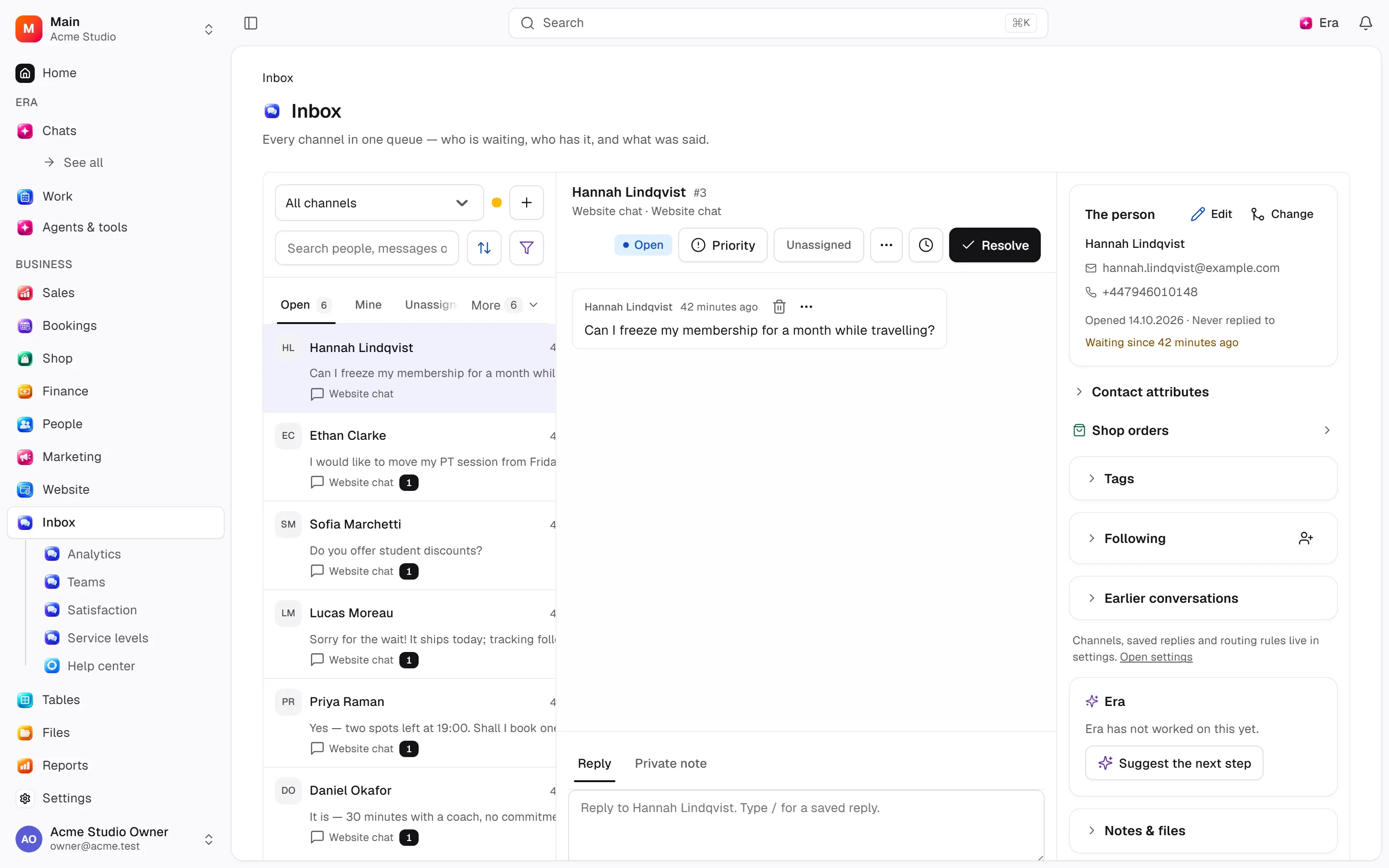
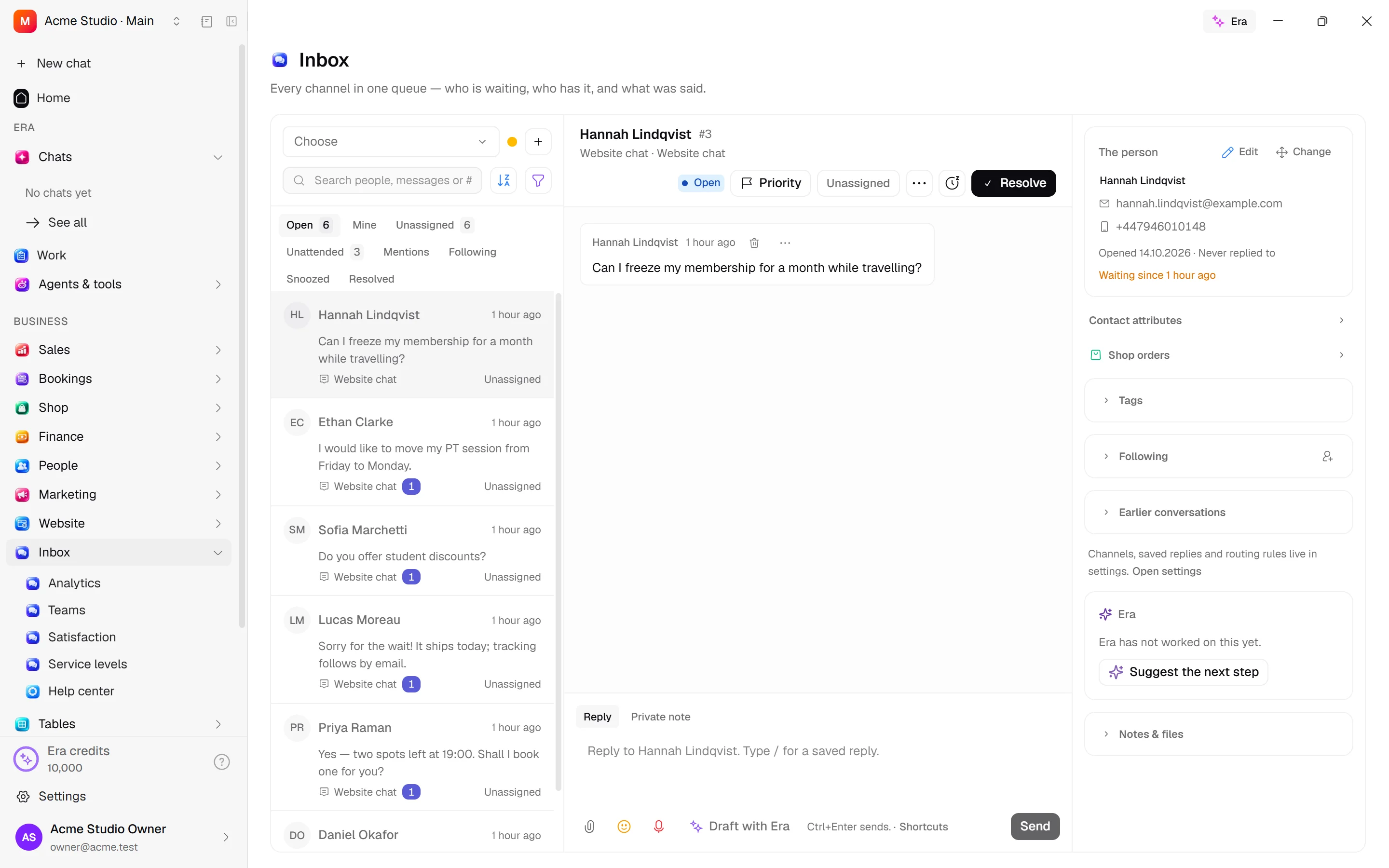
Web: open Inbox. Desktop: Business → Inbox, using the same record paths. Disabled modules or missing read permission remove the navigation entry.
| Screen / tab | Web path | Usage | Desktop |
|---|---|---|---|
| Inbox | /inbox | List, view or tab | Native screen |
| Analytics | /inbox/analytics | List, view or tab | Native screen |
| Teams | /inbox/teams | List, view or tab | Native screen |
| Satisfaction | /inbox/csat | List, view or tab | Native screen |
| Service levels | /inbox/sla | List, view or tab | Native screen |
| Search | /inbox/search | List, view or tab | Native screen |
Record tabs and panels
These contributions appear when their modules are enabled and permitted, alongside the record’s own tabs. Check module/permission state if missing.
| Area | Kind | Owning module |
|---|---|---|
| Tasks | Panel | ai |
Start working
Step 1
Choose assigned/unassigned views.
Step 2
Read conversation/customer/attachments.
Step 3
Reply or add notes; use saved responses/macros.
Step 4
Assign/prioritise/follow/snooze/resolve/reopen.
Step 5
Use search, bulk actions, analytics, satisfaction and SLA.
Settings
Option-by-option configuration and screen paths: Settings guide.
- Channels ·
/settings/inbox - Connect a channel ·
/settings/inbox/connect - Saved replies ·
/settings/inbox/canned-responses - Routing ·
/settings/inbox/routing - Macros ·
/settings/inbox/macros - Service level targets ·
/settings/inbox/sla - Bots ·
/settings/inbox/bots
Permissions and limits
Before you start
Private notes stay internal. Delivery depends on adapter/connection health. Business-hour SLA clocks use channel hours.
Role capabilities: Read (read), Write (write), Delete/archive (delete), Manage (manage), Comment (comment), Handle automated delivery/jobs (handle), Export (export), Own records only (own_records_only).
Own-record restrictions apply equally to lists, records and Era. Record state or missing data can refuse an otherwise permitted action.
Ask Era
Summarise the conversation and draft a reply.
Select relevant records for Era context. Era respects modules/roles; external or confirmation-sensitive work can stop for approval. Use era tools in the terminal to inspect currently available tools.
Automation and events
These declared events are available to module-event triggers. Subscribing does not configure the next operation; choose recipients, conditions and actions separately.
Operation details
The inventory includes record, configuration, visitor and background flows. IDs support Era/automation; not every row is a menu button. Asterisks mark required inputs. Unmapped rows do not imply a visible control.
| Operation and ID | Inputs | Permission | Screen or flow |
|---|---|---|---|
Connect a channel · inbox.create_inbox | Name *, Channel *, Number or account, Channel settings, Credential, Who works it | Manage | /settings/inbox/connect, /voice |
Edit an inbox · inbox.update_inbox | Inbox *, Name, Send a greeting, Greeting, Out of office message, Only answer in working hours, Timezone, Assign automatically, Ask for an email address, Ask for a rating when resolved, Allow replies after resolving, One conversation per person, Sender name, Business name, Help centre, Channel settings, Survey settings | Manage | /settings/inbox, /settings/inbox/connect, /voice/[id] |
Take a channel out of service · inbox.deactivate_inbox | Inbox * | Manage | /settings/inbox |
Set who works an inbox · inbox.set_inbox_members | Inbox *, People * | Manage | /settings/inbox |
Open a conversation · inbox.open_conversation | Inbox *, Person *, Channel address, Team, Priority, Channel reference | Write | /inbox |
Take in an arriving message · inbox.ingest | Inbox *, Person *, The provider’s id for this message *, What they said, Name at the provider, Channel address, Channel address value, Kind of message, Attachments, Replies to (email ids), Start a new thread unless replying | Handle automated delivery/jobs | Record/API/visitor flow; no separate screen button mapped |
Assign a conversation · inbox.assign | Conversation *, Agent | Write | /inbox |
Move a conversation to a team · inbox.assign_team | Conversation *, Team | Write | /inbox |
Hand a conversation to a bot · inbox.assign_bot | Conversation *, Bot | Write | /inbox |
Register a bot · inbox.save_agent_bot | Bot, Name *, Description, Where we send its events | Manage | /settings/inbox/bots |
Reset a bot’s token or secret · inbox.reset_agent_bot_credentials | Bot *, What to reset * | Manage | /settings/inbox/bots |
Remove a bot · inbox.delete_agent_bot | Bot * | Manage | /settings/inbox/bots |
Choose the bot on an inbox · inbox.set_inbox_bot | Inbox *, Bot | Manage | /settings/inbox/bots |
A bot replies · inbox.bot_reply | Bot *, Conversation *, Message, Kind of message, Options, cards or form | Handle automated delivery/jobs | Record/API/visitor flow; no separate screen button mapped |
A bot hands over or resolves · inbox.bot_set_status | Bot *, Conversation *, Status *, Why | Handle automated delivery/jobs | Record/API/visitor flow; no separate screen button mapped |
Record a bot delivery · inbox.record_bot_delivery | Bot *, What went wrong | Handle automated delivery/jobs | Background routine |
Assign automatically · inbox.auto_assign | Conversation * | Write | /inbox |
Resolve a conversation · inbox.resolve | Conversation * | Write | /inbox |
Reopen a conversation · inbox.reopen | Conversation * | Write | /inbox |
Snooze a conversation · inbox.snooze | Conversation *, Until * | Write | /inbox |
Set priority · inbox.set_priority | Conversation *, Priority | Write | /inbox |
Mark read · inbox.mark_read | Conversation * | Read | Record/API/visitor flow; no separate screen button mapped |
Mark unread · inbox.mark_unread | Conversation * | Read | /inbox |
Add a follower · inbox.add_participant | Conversation *, Person * | Write | /inbox |
Remove a follower · inbox.remove_participant | Conversation *, Person * | Write | /inbox |
Move a conversation to another person · inbox.change_customer | Conversation *, Person * | Write | /inbox |
Reply · inbox.reply | Conversation *, Message, Kind, Attachments, Saved reply, WhatsApp template, Template values, Cc, Bcc, In reply to | Write | /inbox |
Add a private note · inbox.add_private_note | Conversation *, Message, Kind, Attachments, Saved reply, WhatsApp template, Template values, Cc, Bcc, In reply to | Comment | /inbox |
Edit a message · inbox.edit_message | Message *, Message * | Write | /inbox |
Delete a message · inbox.delete_message | Message * | Delete/archive | /inbox |
Save a reply · inbox.save_canned_response | Saved reply, Shortcut *, Reply * | Manage | /settings/inbox/canned-responses |
Save this as a reply · inbox.save_reply_from_message | Message *, Shortcut * | Manage | /inbox |
Translate a message · inbox.translate_message | Message *, Language * | Write | /inbox |
Save Inbox preferences · inbox.set_member_preference | Availability, Message signature, Play audio alerts | Read | /settings/inbox |
Set automatic resolution · inbox.set_auto_resolve | Inbox *, Hours of inactivity (1–8760), Activity note | Manage | /settings/inbox |
Sync WhatsApp templates · inbox.sync_whatsapp_templates | WhatsApp inbox * | Manage | /settings/inbox |
Delete a saved reply · inbox.delete_canned_response | Saved reply * | Manage | /settings/inbox/canned-responses |
Save a team · inbox.save_team | Team, Name *, Description, Assign automatically within the team | Manage | /inbox/teams |
Set a team’s members · inbox.set_team_members | Team *, People * | Manage | /inbox/teams |
Delete a team · inbox.delete_team | Team *, Delete anyway | Manage | /inbox/teams |
Save a routing rule · inbox.save_assignment_policy | Rule, Name *, Description, Order, Queue order, Most per agent in the window, Window (seconds), Enabled | Manage | /settings/inbox/routing |
Set an inbox’s routing rule · inbox.set_inbox_policy | Inbox *, Rule | Manage | /settings/inbox |
Record what a channel said · inbox.record_delivery | Message, Inbox, Provider message id, Status *, Attempt generation, Provider message id, Reason, Attempts (0–100) | Handle automated delivery/jobs | Record/API/visitor flow; no separate screen button mapped |
Retry sending · inbox.retry_delivery | Message * | Write | /inbox |
Record that the visitor saw the thread · inbox.record_visitor_seen | Conversation * | Handle automated delivery/jobs | Record/API/visitor flow; no separate screen button mapped |
Change several conversations · inbox.bulk_update | Conversations *, Status, Snooze until, Assign to, Return to the queue, Team, Take off the team, Priority | Write | /inbox |
Save a macro · inbox.save_macro | Macro, Name *, Who can use it, Steps * | Write | /settings/inbox/macros |
Delete a macro · inbox.delete_macro | Macro * | Write | /settings/inbox/macros |
Run a macro · inbox.run_macro | Macro *, Conversations * | Write | /inbox |
Take a rating · inbox.submit_csat | Conversation *, Rating * (1–5), Comment | Handle automated delivery/jobs | Record/API/visitor flow; no separate screen button mapped |
Review a rating · inbox.review_csat | Rating *, Review notes | Write | Record/API/visitor flow; no separate screen button mapped |
Mute · inbox.mute | Conversation * | Write | /inbox |
Unmute · inbox.unmute | Conversation * | Write | /inbox |
Email the transcript · inbox.send_transcript | Conversation *, Send to | Write | /inbox |
Set business hours · inbox.set_working_hours | Inbox *, Week *, Use business hours, Out-of-office message, Timezone | Manage | Record/API/visitor flow; no separate screen button mapped |
Save an SLA policy · inbox.save_sla_policy | Policy, Name *, Description, First response within (seconds), Next response within (seconds), Resolution within (seconds), Count business hours only | Manage | Record/API/visitor flow; no separate screen button mapped |
Delete an SLA policy · inbox.delete_sla_policy | Policy * | Manage | Record/API/visitor flow; no separate screen button mapped |
Apply an SLA · inbox.apply_sla | Conversation *, Policy * | Write | Record/API/visitor flow; no separate screen button mapped |
Check an SLA · inbox.evaluate_sla | Applied SLA * | Handle automated delivery/jobs | Record/API/visitor flow; no separate screen button mapped |
Record a connection test · inbox.record_channel_health | Inbox *, Status *, Reason, Provider details | Handle automated delivery/jobs | Record/API/visitor flow; no separate screen button mapped |
Record the mailbox cursor · inbox.record_poll_state | Inbox *, Cursor * | Handle automated delivery/jobs | Record/API/visitor flow; no separate screen button mapped |
Sign a mailbox in with Gmail or Outlook · inbox.set_mailbox | Inbox *, Account * | Manage | Record/API/visitor flow; no separate screen button mapped |
Give a conversation to Era · inbox.assign_era | Conversation *, Era * | Write | /inbox |
Related guides
Views search and folders
Steps, actions and related settings.
Settings
Options, screen paths and defaults.
Workflows
Operations managers connect triggered blocks on a canvas with conditions, loops and approval waits.
Inbox
Inbox — modules and detailed settings
Technical sources
packages/os-kernel/src/modules/inbox.ts, packages/os-kernel/src/modules/index.ts, apps/studio/lib/os/navigation.ts, apps/studio/lib/os/settings-groups.ts, apps/era-station/apps/web/src/era/business/screens.ts.
Screen pictures
Report details
Click an agent, team or label in Inbox analytics to open its detail report. The period and business-hours controls apply to response clocks. Daily activity and up to 100 recent conversations are shown; open a conversation to continue work. Conversation lists reflect current assignment and labels, while response clocks reflect recorded events.