Leads and pipeline
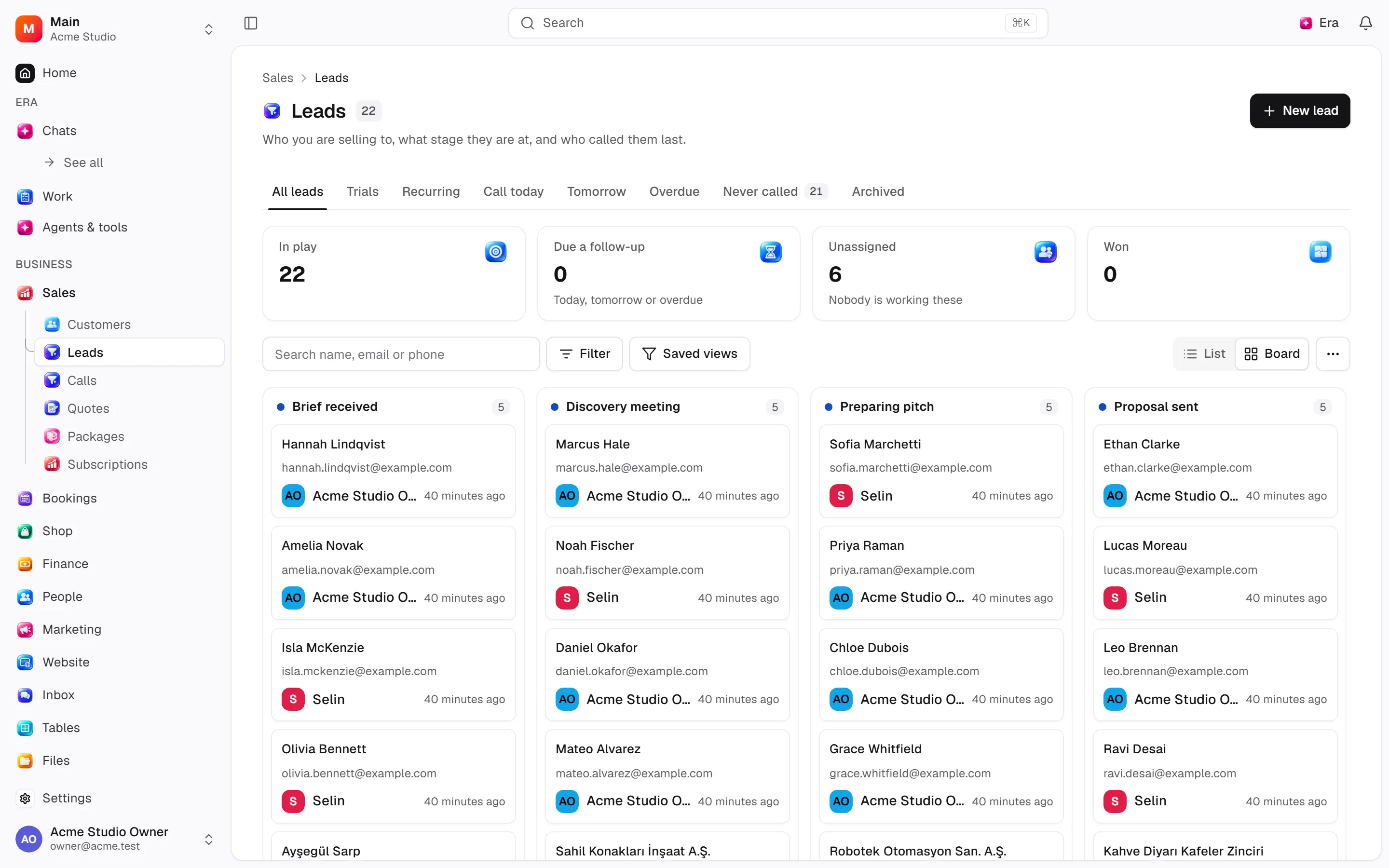
Sales teams track progress toward buying. Customers identify people; leads track the sales pursuit and calls.
Sales teams track progress toward buying. Customers identify people; leads track the sales pursuit and calls.
Where to find it
Web: open Sales. Desktop: Business → Sales, using the same record paths. Disabled modules or missing read permission remove the navigation entry.
| Screen / tab | Web path | Usage | Desktop |
|---|---|---|---|
| Leads | /leads | List, view or tab | Native screen |
| Calls | /leads/calls | List, view or tab | Native screen |
| Affiliates | /leads/affiliates | List, view or tab | Native screen |
| New | /leads/new | List, view or tab | Native screen |
| Recurring | /leads/recurring | List, view or tab | Native screen |
| Trials | /leads/trials | List, view or tab | Native screen |
| Record details | /leads/[id] | Record or editor | Native screen |
| Needs follow-up | /leads/calls/followup | List, view or tab | Native screen |
| Never called | /leads/calls/never | List, view or tab | Native screen |
| New | /leads/calls/new | List, view or tab | Native screen |
| Call templates | /leads/calls/templates | List, view or tab | Native screen |
| New affiliate | /leads/affiliates/new | List, view or tab | Native screen |
| Record details | /leads/affiliates/[id] | Record or editor | Native screen |
Record tabs and panels
These contributions appear when their modules are enabled and permitted, alongside the record’s own tabs. Check module/permission state if missing.
| Area | Kind | Owning module |
|---|---|---|
| Tasks | Panel | ai |
| Payment | Panel | finance |
| Payment status | Column | finance |
| Documents | Tab | lead_documents |
| Meetings | Panel | meetings |
| Quotes | Tab | quotes |
Start working
Step 1
Choose or create the customer.
Step 2
Open a lead with source, owner, message and trial duration.
Step 3
Filter by view, stage, source and owner.
Step 4
Move stage, assign, start a trial or log a call.
Step 5
Choose a loss reason; restore archived leads when needed.
Settings
Option-by-option configuration and screen paths: Settings guide.
- General ·
/settings/sales - Pipeline ·
/settings/sales/pipeline - Calls ·
/settings/sales/calls - Loss reasons ·
/settings/sales/loss-reasons
Permissions and limits
Before you start
Deals are lead stages, without a separate module. Calls can auto-close a lead; suspended and closed leads are protected. Affiliates are off by default.
Role capabilities: Read (read), Write (write), Delete/archive (delete), Manage (manage), Export (export), Import (import), Comment (comment), Own records only (own_records_only).
Own-record restrictions apply equally to lists, records and Era. Record state or missing data can refuse an otherwise permitted action.
Ask Era
Show this week’s leads needing follow-up by owner.
Select relevant records for Era context. Era respects modules/roles; external or confirmation-sensitive work can stop for approval. Use era tools in the terminal to inspect currently available tools.
Automation and events
These declared events are available to module-event triggers. Subscribing does not configure the next operation; choose recipients, conditions and actions separately.
Operation details
The inventory includes record, configuration, visitor and background flows. IDs support Era/automation; not every row is a menu button. Asterisks mark required inputs. Unmapped rows do not imply a visible control.
| Operation and ID | Inputs | Permission | Screen or flow |
|---|---|---|---|
Flag quiet leads · crm.raise_stale_leads | — | Write | Background routine |
Open a lead · crm.capture_lead | Person *, Source, Stage, Assigned to, Note for the owner, What they said, Referred by, Trial length (days) (0–365) | Write | /brain, /leads |
Edit a lead · crm.update_lead | Lead *, Source, Assigned to, Note for the owner, What they said, Referred by, Trial length (days) (0–365), Deal value, Deal currency, Expected close | Write | /leads, /leads/[id] |
Move a lead · crm.set_lead_stage | Lead *, Stage *, Reason | Write | /leads, /leads/[id] |
Assign a lead · crm.assign_lead | Lead *, Owner | Write | /leads, /leads/[id] |
Start a trial · crm.start_trial | Lead *, Length (days) (1–365) | Write | /leads, /leads/[id] |
Cancel a lead · crm.cancel_lead | Lead *, Reason * | Write | /leads/[id] |
Archive a lead · crm.archive_lead | Lead * | Delete/archive | /leads/[id] |
Restore a lead · crm.restore_lead | Lead * | Delete/archive | /leads, /leads/[id] |
Log a call · crm.log_call | Lead *, Outcome *, Result *, Duration (minutes) (0–1440), Notes, Important, Follow up on, At, Follow-up notes | Write | /leads, /leads/[id] |
Correct a call · crm.amend_call | Call *, Outcome, Result, Notes, Duration (minutes) (0–1440), Important, Follow up on, At, Follow-up notes | Write | /leads/[id] |
Add or rename a loss reason · crm.set_lost_reason | Reason, Name *, Order | Manage | /settings/sales |
Close a loss reason · crm.deactivate_lost_reason | Reason * | Manage | /settings/sales |
Add or rename a lead source · crm.set_lead_source | Source, Key *, Name *, Order | Manage | /settings/sales/pipeline |
Add or change a stage · crm.set_lead_stage_definition | Stage, Key *, Name *, Means *, Order, Chance of winning (%) (0–100) | Manage | /settings/sales/pipeline |
Add or change a call outcome · crm.set_call_status | Outcome, Key *, Name *, Counts as * | Manage | /settings/sales |
Add or change a call result · crm.set_call_result | Result, Key *, Name *, Counts as * | Manage | /settings/sales |
Open or close a call option · crm.set_call_option_active | Vocabulary *, Option *, Open * | Manage | /settings/sales |
Merge loss reasons · crm.merge_lost_reasons | Reasons to merge *, Keep this one * | Manage | /settings/sales |
Save a call template · crm.create_call_template | Template, Name *, Text *, In use | Manage | /leads/calls/templates |
Close a call template · crm.deactivate_call_template | Template * | Manage | /leads/calls/templates |
Add or edit an affiliate · crm.save_affiliate | Affiliate, Name *, Email, Phone, Commission type *, Rate (%) (0–100), Fixed amount, Currency, Earned, Notes | Manage | /leads/affiliates |
Close an affiliate · crm.deactivate_affiliate | Affiliate * | Manage | /leads/affiliates |
Export leads · crm.export_leads | View, Search, Stage, Source, Owner, Added from, Added until, Only these leads | Export | Record/API/visitor flow; no separate screen button mapped |
Export calls to Excel · crm.export_calls | Outcome, Called by, Called from, Called until | Export | Record/API/visitor flow; no separate screen button mapped |
Send an affiliate their report link · crm.issue_affiliate_report_link | Affiliate *, Link for, Open for (days) (1–365) | Manage | /leads/affiliates/[id] |
Close an affiliate report link · crm.revoke_affiliate_report_link | Link * | Manage | /leads/affiliates/[id] |
Credit a lead to an affiliate · crm.attribute_lead | Lead *, Affiliate, Move existing credit | Write | /leads/[id] |
Open or close a stage · crm.set_lead_stage_active | Stage *, Open * | Manage | /settings/sales/pipeline |
Open or close a lead source · crm.set_lead_source_active | Source *, Open * | Manage | /settings/sales/pipeline |
Related guides
Calls and follow-up
Steps, actions and related settings.
Affiliates and commissions
Steps, actions and related settings.
Settings
Options, screen paths and defaults.
Workflows
Operations managers connect triggered blocks on a canvas with conditions, loops and approval waits.
Sales
Sales — modules and detailed settings
Technical sources
packages/os-kernel/src/modules/crm.ts, packages/os-kernel/src/modules/index.ts, apps/studio/lib/os/navigation.ts, apps/studio/lib/os/settings-groups.ts, apps/era-station/apps/web/src/era/business/screens.ts.
Screen pictures
Sales overview
The Follow-ups due tomorrow tile uses the workspace local date and opens tomorrow's follow-up list. Collections trend shows the last twelve calendar months, keeping currencies in separate charts. It is hidden without Finance read permission.