Pages menu and content
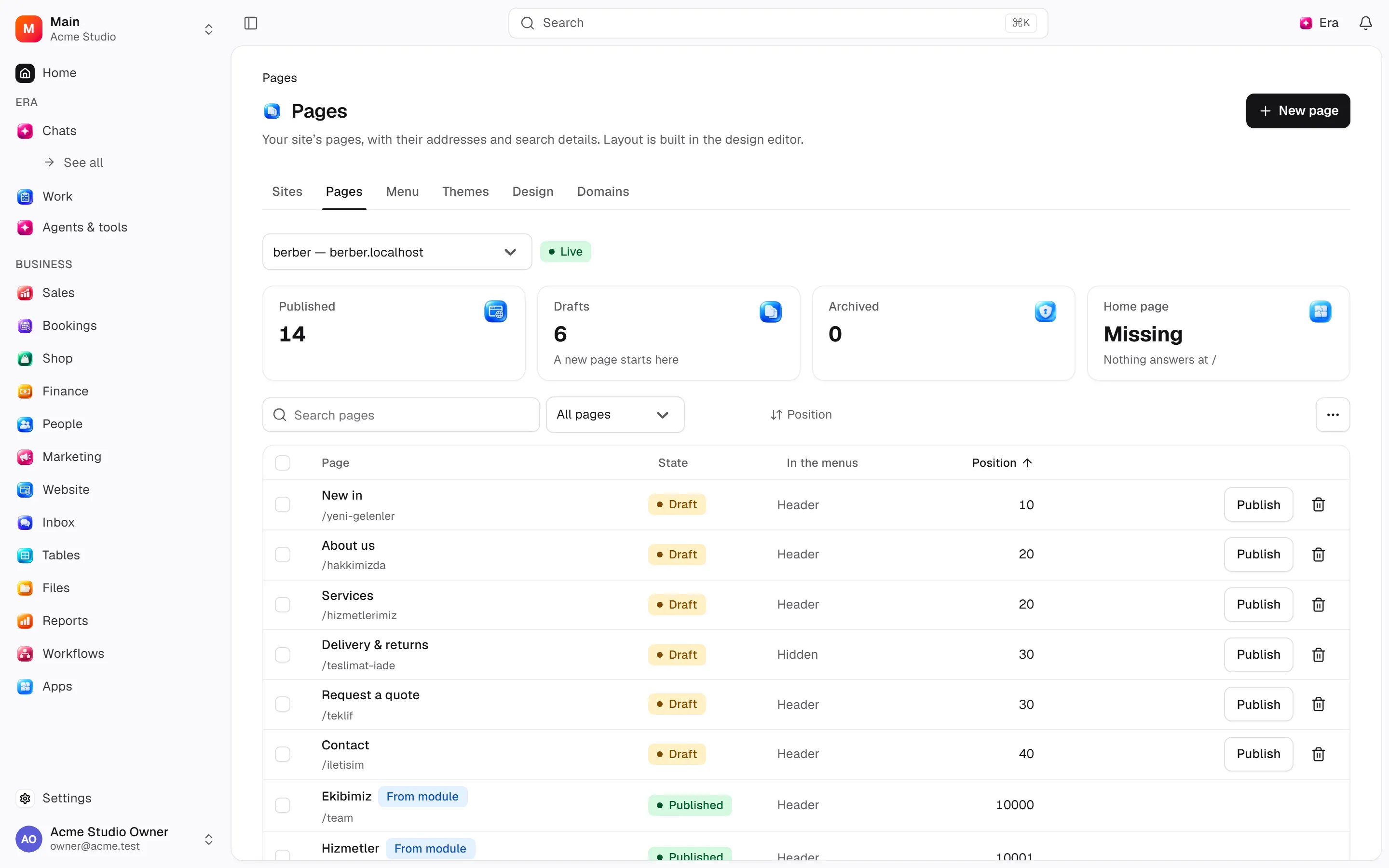
Content teams manage pages and the menu, blog/news and contact content; the same Site screen holds design and domains.
Content teams manage pages and the menu, blog/news and contact content; the same Site screen holds design and domains.
Where to find it
Web: open Website. Desktop: Business → Website, using the same record paths. Disabled modules or missing read permission remove the navigation entry.
| Screen / tab | Web path | Usage | Desktop |
|---|---|---|---|
| Pages and the menu | /sites | Tab of Site | Native screen |
| Blog | /site/blog | List, view or tab | Native screen |
| News | /site/news | List, view or tab | Native screen |
| FAQ | /site/faq | List, view or tab | Native screen |
| References | /site/references | List, view or tab | Native screen |
| Messages | /site/messages | List, view or tab | Native screen |
| Record details | /site/pages/[id] | Record or editor | Native screen |
| Record details | /site/news/[id] | Record or editor | Native screen |
| Record details | /site/blog/[id] | Record or editor | Native screen |
Pages and the menu are one list: each page has a header-menu and a footer-menu switch and its place in the order. Design, Domains and All sites are the other tabs of the same Site screen.
Start working
Step 1
Open Site (the Pages tab).
Step 2
Create pages with paths/content/SEO/status.
Step 3
Put pages in the header/footer menu with their switches, order them with the arrows, and set the home page.
Step 4
Manage blog/news, taxonomy/authors and scheduling.
Step 5
Manage FAQ/references/messages and company/contact settings.
Settings
Option-by-option configuration and screen paths: Settings guide.
- Company ·
/settings/site - Contact ·
/settings/site/contact - Legal pages ·
/settings/site/policies - Redirects ·
/settings/site/redirects - What visitors can do ·
/settings/site/visitors
Permissions and limits
Before you start
Page/theme/site publication are separate. Legal types are privacy, terms and cookies.
Role capabilities: Read (read), Write (write), Delete/archive (delete), Manage (manage), Export (export), Comment (comment).
Own-record restrictions apply equally to lists, records and Era. Record state or missing data can refuse an otherwise permitted action.
Ask Era
Edit the About draft and show before publishing.
Select relevant records for Era context. Era respects modules/roles; external or confirmation-sensitive work can stop for approval. Use era tools in the terminal to inspect currently available tools.
Automation and events
These declared events are available to module-event triggers. Subscribing does not configure the next operation; choose recipients, conditions and actions separately.
Operation details
The inventory includes record, configuration, visitor and background flows. IDs support Era/automation; not every row is a menu button. Asterisks mark required inputs. Unmapped rows do not imply a visible control.
| Operation and ID | Inputs | Permission | Screen or flow |
|---|---|---|---|
Add a page · site.create_page | Site *, Title *, Address, Under, Show in the header menu, Show in the footer menu, Position | Write | /sites |
Edit a page · site.update_page | Page *, Title, Address, Search title, Search description, Keywords, Position | Write | /site/pages/[id] |
Publish or archive a page · site.set_page_status | Page *, State * | Write | /sites, /site/pages/[id] |
Make this the home page · site.set_homepage | Page * | Write | /sites, /site/pages/[id] |
Change the menu · site.set_page_nav | Page *, Header menu, Footer menu, Position | Write | /sites, /site/pages/[id] |
Move a page · site.move_page | Page *, Under | Write | /site/pages/[id] |
Delete a page · site.delete_page | Page * | Delete/archive | /sites, /site/pages/[id] |
Add a redirect · site.set_redirect | Site *, Old address *, Goes to *, Kind (301–308), Why | Manage | /settings/site/redirects |
Remove a redirect · site.delete_redirect | Redirect * | Manage | /settings/site/redirects |
Write a post · site.save_post | Site *, Post, Title *, Address, Excerpt, Body, Category, Author, Search title, Search description, Keywords, Featured, Cover image | Write | Record/API/visitor flow; no separate screen button mapped |
Publish a post · site.publish_post | Post *, Scheduled run | Write | /site/blog |
Take a post down · site.unpublish_post | Post *, State | Write | /site/blog |
Schedule publication · site.schedule_content | Article *, Kind *, Publish at * | Write | Record/API/visitor flow; no separate screen button mapped |
Cancel scheduled publication · site.cancel_scheduled_content | Article *, Kind * | Write | Record/API/visitor flow; no separate screen button mapped |
Tag a post · site.tag_post | Post *, Tag * | Write | Record/API/visitor flow; no separate screen button mapped |
Remove a tag · site.untag_post | Post *, Tag * | Write | Record/API/visitor flow; no separate screen button mapped |
Save a blog category · site.save_blog_category | Site *, Category, Name *, Address, Description, Colour, Icon, Position, In use | Manage | /site/blog |
Save a blog tag · site.save_blog_tag | Site *, Tag, Name *, Address, Visible on the site | Manage | /site/blog |
Save an author · site.save_blog_author | Site *, Author, Person *, Shown as *, Introduction, Visible on the site | Manage | /site/blog |
Delete blog category, tag or author · site.delete_blog_taxonomy | Entry *, Kind * | Manage | /site/blog |
Reorder blog categories · site.reorder_blog_categories | Site *, Categories in order * | Manage | /site/blog |
Write a news item · site.save_news | Site *, News item, Title *, Address, Summary, Body, Search title, Search description, Featured, Cover image, Publication date | Write | Record/API/visitor flow; no separate screen button mapped |
Publish or archive news · site.set_news_status | News item *, State *, Scheduled run | Write | /site/news |
Save an FAQ group · site.save_faq_category | Site *, Group, Name *, Address, Description, Icon, Position, Shown on the site | Manage | /site/faq |
Save a question · site.save_faq_item | Site *, Question, Group, Question *, Answer *, Position, Shown on the site | Write | /site/faq |
Reorder the questions · site.reorder_faq | Site *, New order * | Write | /site/faq |
Remove an FAQ question · site.delete_faq_item | Question * | Delete/archive | /site/faq |
Remove an FAQ group · site.delete_faq_category | Group * | Delete/archive | /site/faq |
Save a reference · site.save_reference | Site *, Reference, Client *, Sector, Logo, Project, What you did, Project images, Link, Quote, Said by, Their role, Featured, Shown on the site, Position | Write | /site/references |
Remove a reference · site.delete_reference | Reference * | Delete/archive | Record/API/visitor flow; no separate screen button mapped |
Save the company details · site.set_site_info | Site *, Company name *, About, Slogan, Founded, Footer text, Copyright line, Website, Search description, Keywords, Logo (light), Logo (dark), Favicon | Manage | Record/API/visitor flow; no separate screen button mapped |
Save the contact details · site.set_contact_info | Site *, Email, Phone, Address, Instagram, TikTok, LinkedIn, Facebook, YouTube, X | Manage | Record/API/visitor flow; no separate screen button mapped |
Save a legal page · site.set_policy | Site *, Which *, Title *, Text *, Shown on the site | Manage | Record/API/visitor flow; no separate screen button mapped |
Send a message · site.submit_contact | Site *, Name *, Email *, Subject *, Company, Phone, Country code (1–999), Message, Browser, Website | Write | Record/API/visitor flow; no separate screen button mapped |
Mark a message · site.mark_submission | Message *, State * | Write | /site/messages |
Related guides
Settings
Options, screen paths and defaults.
Workflows
Operations managers connect triggered blocks on a canvas with conditions, loops and approval waits.
Website
Website — modules and detailed settings
Technical sources
packages/os-kernel/src/modules/site.ts, packages/os-kernel/src/modules/index.ts, apps/studio/lib/os/navigation.ts, apps/studio/lib/os/settings-groups.ts, apps/era-station/apps/web/src/era/business/screens.ts.
Screen pictures
Assign one image to selected content
Select rows in Blog, News or References and choose Assign image in the selection bar. Pick or upload an image. It changes the blog/news cover or reference client logo while preserving text, publication state and other fields. Web and native desktop use the same action.